
The short version
$1,$2put back what brackets captured, left to right.$0is the whole match.- An empty Replacement deletes whatever matched.
- Every match is replaced, not just the first one.
- Case matters unless you switch on Ignore case, or start the pattern with
(?i). ^and$mean the start and end of the whole text. For per-line anchors, start the pattern with(?m).- A dot matches any character. To mean a literal dot, write
\..
Patterns you can paste
Every one of these was run through the engine before it went on this page, and the Example column is what actually came back. Where the result comes out on several lines, the Example column shows those lines.
| Task | Pattern | Replacement | Example |
|---|---|---|---|
| Hostname out of an FQDN | ^([^.]+)\..*$ | $1 | servername.internal.domain.local → servername |
| Any URL down to its domain | ^https?://(?:www\.)?([^/\s?#]+).*$ | $1 | https://www.klipto.me/guides/regex-replace/?ref=x → klipto.me |
| Last segment of a path | .*/([^/]+)/?$ | $1 | /users/42/orders/8891/ → 8891 |
| Email address out of a sentence | .*?([\w.+-]+@[\w-]+\.[\w.]+).* | $1 | Write to [email protected] today → [email protected] |
| Reorder a date | (\d{4})-(\d{2})-(\d{2}) | $3.$2.$1 | due 2026-09-18 → due 18.09.2026 |
| Surname first | ^(\w+)\s+(\w+)$ | $2, $1 | Antony Kors → Kors, Antony |
| Phone number down to digits | [^\d+] | (empty) | +1 (415) 555-0132 → +14155550132 |
| Keep the number, drop the rest | [^\d.] | (empty) | Total: $1,299.00 USD → 1299.00 |
| Drop list numbering | (?m)^\d+[.)]\s+ | (empty) | 1. Install Klipto → Install Klipto |
| Drop a leading timestamp | ^\[?(\d{2}:\d{2}:\d{2})\]?\s* | (empty) | [12:03:44] server restarted → server restarted |
| Collapse runs of spaces | [ \t]{2,} | one space | name value → name value |
| Trim trailing whitespace | (?m)[ \t]+$ | (empty) | "total: 42 " → "total: 42" |
| Blank lines down to one | \n{3,} | two newlines | intro body → intro body |
| Curly quotes to straight | [“”‘’] | " | “hello” → "hello" |
| Strip HTML tags | <[^>]+> | (empty) | <p>Hi <b>you</b></p> → Hi you |
| Markdown links to their text | \[([^\]]+)\]\([^)]+\) | $1 | see [the guide](https://klipto.me/x/) → see the guide |
| Comma list to one per line | ,\s* | a newline | red, green, blue → red green blue |
| Shout a word wherever it appears | (?i)\berror\b | ERROR | Error, then error → ERROR, then ERROR |
| Remove every link from a block | \s*https?://\S+ | (empty) | read https://a.io/x then stop → read then stop |
| Find the dates in a log | \d{4}-\d{2}-\d{2} | <date> | from 2026-09-18 to 2026-10-01 → from <date> to <date> |
| Find the IPv4 addresses in a log | (?:(?:25[0-5]|2[0-4]\d|[01]?\d\d?)\.){3}(?:25[0-5]|2[0-4]\d|[01]?\d\d?) | <ip> | from 10.0.0.1 to 192.168.247.209 → from <ip> to <ip> |
| Put the # back on hex colours | #?\b([a-fA-F0-9]{6}|[a-fA-F0-9]{3})\b | #$1 | 4F46E5 and fff → #4F46E5 and #fff |
| Mask an email for a screenshot | ([\w.+-])[\w.+-]*(@.*) | $1***$2 | [email protected] → a***@klipto.me |
| Strip the bullet off every line | (?m)^\s*[-*•]\s+ | (empty) | - ship the guide → ship the guide |
How to read a pattern
Characters stand for themselves until they do not. Letters and digits match themselves. These twelve do something else: . ^ $ * + ? ( ) [ ] { } \ |. Put a backslash in front to mean the character itself, so \. is a full stop and \$ is a dollar sign.
Brackets pick from a set. [abc] is one of those three letters. [a-z] is any lowercase letter, [0-9] any digit. A ^ inside the brackets flips it: [^.] is any character that is not a dot, which is what makes the hostname pattern stop at the first one.
Shorthands cover the common sets. \d is a digit, \w is a letter, digit or underscore, \s is any whitespace. Their capitals are the opposite: \D is anything that is not a digit.
Quantifiers say how many. * is none or more, + is one or more, ? is none or one, {3} is exactly three and {2,} is two or more. They apply to the thing right before them, so \d{4} is four digits and [a-z]+ is a run of letters.
Greedy is the default, and it is the usual surprise. .* takes as much as it can and gives back only what it must. In <p>Hello <b>you</b></p> the pattern <.*> matches the entire line rather than one tag. Add ? to make a quantifier lazy: <.*?> stops at the first >. [^>]+ is stricter still and faster, which is why the strip-tags recipe uses it.
Brackets also capture. Anything inside ( ) is remembered and comes back as $1, $2 and so on, numbered by their opening bracket. That is how the date recipe reorders three groups without knowing what the date is.
Anchors pin the match. ^ is the start, $ is the end, and \b is a word boundary, which is why \berror\b leaves errors alone. In this engine ^ and $ mean the start and end of the entire copied text by default. A three-line log is one string, so a pattern that works in your editor may find nothing here until you put (?m) at the front.
| is or, and brackets group it. (jpg|png|gif) matches any of the three. Without the brackets the alternatives would swallow everything either side.
The symbols, at a glance. ^ start, $ end, . any character, \d digit, \D not a digit, \w letter, digit or underscore, \s whitespace, + one or more, * none or more, ? none or one, {2,} two or more, [abc] one of these, [^abc] anything but these, (…) capture, (?:…) group without capturing, \b word boundary, | or, \ escape the next character.
Patterns for checking, not replacing
The best known regular expressions are validators: is this an email address, is this a real IP. A transform step always replaces, so a validator on its own does nothing here. The shapes are still worth knowing, because the same pattern that checks a value also extracts or masks it.
Email. ^[a-zA-Z0-9._%+-]+@[a-zA-Z0-9.-]+\.[a-zA-Z]{2,}$ is the everyday check: word, @, domain, dot, zone. In a replace step drop the anchors and capture instead, as the email row in the table above does.
Phone in E.164. ^\+?[1-9]\d{1,14}$ accepts +79991234567 and rejects a number with spaces in it. To produce that form rather than check it, strip everything else with [^\d+].
Password strength. ^(?=.*[a-z])(?=.*[A-Z])(?=.*\d)[a-zA-Z\d]{8,}$ asks for eight characters with at least one lowercase, one uppercase and one digit. The (?=…) parts are lookaheads: they test without consuming, which is how one pattern can demand three things at once.
IPv4, strictly. (?:(?:25[0-5]|2[0-4]\d|[01]?\d\d?)\.){3}(?:25[0-5]|2[0-4]\d|[01]?\d\d?) keeps every octet inside 0 to 255. Watch the middle alternative: 2[0-4]\d covers 200 to 249, and a version written 2[0-4][0-6] silently skips addresses like 192.168.247.209. When the text is a log rather than untrusted input, \b(?:\d{1,3}\.){3}\d{1,3}\b is shorter and good enough.
Hex colour. #?\b([a-fA-F0-9]{6}|[a-fA-F0-9]{3})\b matches #4F46E5 and fff, and the group is there so a replacement can normalise them all to one form.
Two traps in patterns copied off the web. Anchors: ^…$ means the whole copied text, so a validator finds nothing inside a sentence until you remove them. And capture position: https?://([^/\s]+)\.[a-z]{2,} puts the zone outside the group, so $1 returns blog.klipto without the .me.
The five mistakes that waste an afternoon
.* ate the line. Make it lazy with .*?, or say what you actually mean with a negated set like [^>]+.
The anchors did nothing. (?m) at the front of the pattern, every time you are working line by line.
\1 in the replacement. That is the sed and Python spelling. Here the replacement uses $1, the same as JavaScript and Swift.
An unescaped dot matched everything. 1.5 also matches 125. Write 1\.5.
Case. Error is not error. Tick Ignore case, or write (?i) at the start.
Where you type this
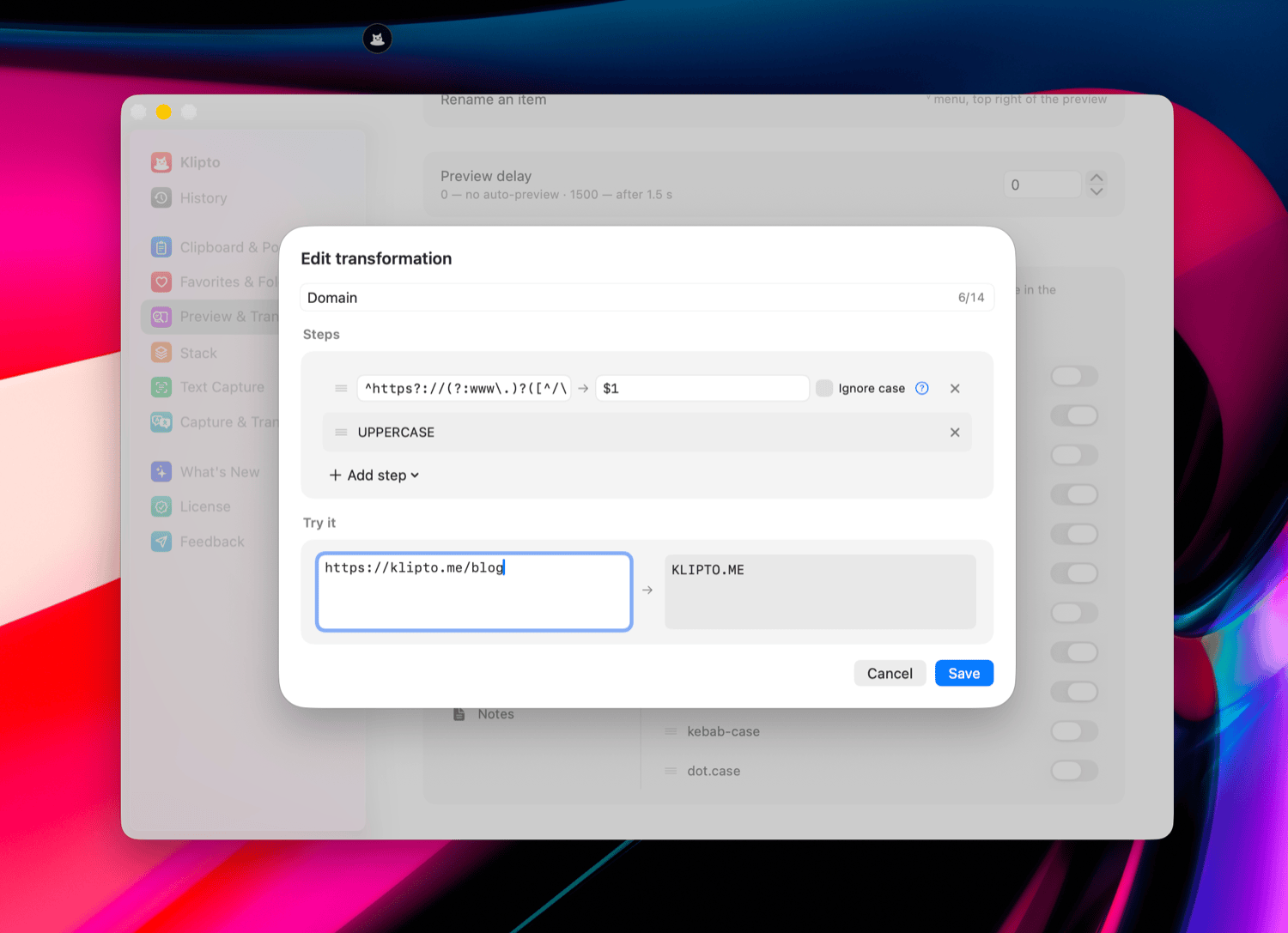
Klipto runs regex replaces on the text you just copied, as a step inside a transform chip. Preferences → Preview & Transforms → pick a content type → create your own transformation → Add step → Regex replace. Pattern and Replacement are the two fields, there is an Ignore case tick beside them, and a Try it box below runs the whole chain against your own sample while you type.
Steps run top to bottom, so a regex can be followed by UPPERCASE, or preceded by Un-HTML. The chain then sits in the paste preview as a one-tap chip. Transform chips covers building and arranging them.
The engine is ICU, through NSRegularExpression, which is what Swift and Objective-C use on a Mac. Patterns written for JavaScript almost always work unchanged. Patterns written for sed or Python may need $1 instead of \1 in the replacement.