
Dropover fixed drag-and-drop on my Mac

Dragging across windows was the one Finder habit I never got comfortable with.

Dropover fixed drag-and-drop on my Mac. You shake the mouse mid-drag, a small shelf appears, you drop the files onto it, and then you carry that shelf anywhere before dropping the files where they belong. It is one of three utilities that set my standard for how a Mac app should behave.

Dragging across windows was the Finder habit I never got comfortable with. Two windows, both half visible, one of them scrolled to the wrong folder, and a drag that fails if you release two pixels early.

Shake, drop, carry

The gesture is the whole product. Start dragging anything, wiggle the pointer, and a shelf spawns under the cursor. Let go and the item sits there. The drag you were failing at is now finished, and finding the destination is a separate job you can take your time over.

The shelf holds more than one thing, and it holds different kinds of thing. Files from Finder, images from a browser, attachments out of Mail, text you selected. You can keep adding to an existing shelf, which means a set of files scattered across four folders becomes one pile you assembled at your own pace.

Getting things out is drag-and-drop again. Pull one item, or take the whole shelf at once. In the version I have there are extra actions on the shelf too, including AirDrop and compressing the contents, though the plain carry is what I use nine times out of ten.

It is on the developer's own site at dropoverapp.com and on the Mac App Store. I am not going to quote you a price, because I would rather you read the current one there than trust a number in a blog post.

What it actually replaced

Before it, my method was a folder on the Desktop called "temp". Everything went in there first, then got sorted later, and later never arrived. I had four of those folders at one point with names ending in 2.

The thing Dropover changed is the order of decisions. Old way: find the destination, then arrange the windows, then drag. New way: grab the file the moment you see it, decide where it goes when you have decided. Collecting design references all week is where I notice it most, because references arrive one at a time from wherever you happened to be looking.
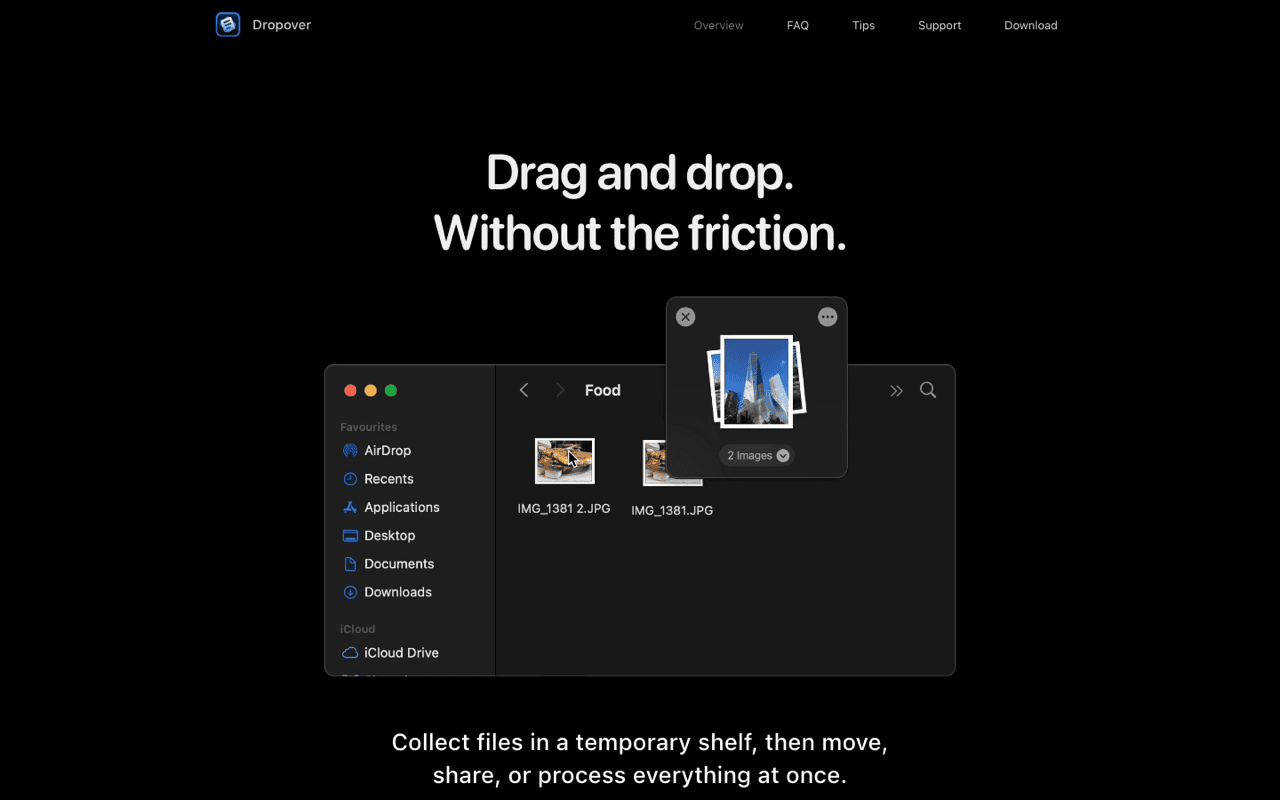
Dropover holding dragged files in a temporary shelf
Source: dropoverapp.com, August 2026.

It also survives space switching. The shelf floats above everything, follows you across desktops and full-screen apps, and does not care that the source window is now gone. That single behaviour removes most of the window-arranging that dragging normally forces on you.

Meet Klipto

Klipto has a shelf too.

The Stack collects text, images and files, then you drag them out one at a time or paste them in order with a shortcut.

See what Klipto does

Where it stops working

The gesture needs room. A short trackpad drag from one side of a small window to the other gives you no distance to shake in, so on a laptop screen the trigger sometimes does not fire. Its settings offer other ways to spawn a shelf, and it is worth going through them once rather than fighting the shake.

It also does not know what you meant. A shelf full of items from six places is a pile with no structure, and if you leave three shelves open for a week you have recreated the temp folder problem with a nicer window. I close them when they are empty and try not to keep more than two.

And it is a background app that watches your drags. On a machine you do not control, or under a strict IT policy, that is a conversation you may not win. The App Store build exists partly for that reason.

For a single file, none of this matters. Two windows and one drag works, and reaching for a utility to move one PNG is overkill.

The bar it set

Dropover, CleanShot and Raycast are the three that shaped what I expect from a Mac utility. All three do one job, appear the instant you ask, and get out of the way without leaving a window behind. None of them makes you visit a dashboard.

CleanShot X screenshot and annotation tool
Source: cleanshot.com, August 2026.

That standard is harder to hit than the feature list suggests. The shake detection has to be sensitive enough to catch a deliberate wiggle and dull enough to ignore normal pointer movement. Nobody thanks you for that work when it is right, and everybody notices the day it fires by accident.

Klipto's Stack came out of the same collect-then-place idea, applied to copied text and images rather than dragged files. Dropover is still what I use for files, and I have no interest in competing with it there.

Frequently asked questions

What does Dropover do?

It creates a floating shelf when you shake the mouse during a drag. You drop files, images or text onto the shelf, move it anywhere including other desktops, and drag the contents out at the destination.

Is Dropover free?

There is a version on the Mac App Store and a build on dropoverapp.com. Pricing has changed over time, so check the developer's site for the current terms rather than any figure quoted elsewhere.

Does Dropover work with text and images, or only files?

Both. Selected text and images dragged out of a browser land on the shelf alongside Finder files.

What if the shake gesture does not trigger?

Short drags do not give it enough movement to detect. Open its settings and set up an alternative trigger, then use that on a laptop screen where distances are small.

Does it replace a clipboard manager?

No. It catches things you drag. Things you copy with ⌘C never touch it, and macOS still keeps only the most recent copied item.

Get Klipto for Mac

Free for 14 days · no card, no account required · 5 MB

Download Klipto